Photos are scattered across phones and chat apps.
Document and manage jobs in one system.
TaskShot brings together and organizes photos, videos, and documents captured in workshops, in the field, or during inspections - with tasks, owners, and full history.
Start simple with one workflow, then expand across teams.
No heavy implementation project required.
Start self-service, or request a guided pilot for larger rollouts
Built for workflows like
Built for teams in auto service, construction, inspection, and insurance.
Work evidence is everywhere - until you need it.
Photos are on phones. Notes are in chat apps. Documents are in email. Tasks are remembered by people instead of tracked in a system.
When a customer asks what happened, a manager needs proof, or a colleague has to continue the job, everything becomes harder than it should be.
Important details get lost between people and tools.
It is hard to prove what was done and when.
Follow-up tasks are forgotten or unclear.
Searching old work history takes too much time.
Create your organization
Create your organization or request a guided rollout.
One case. Every photo, task, note, and file.
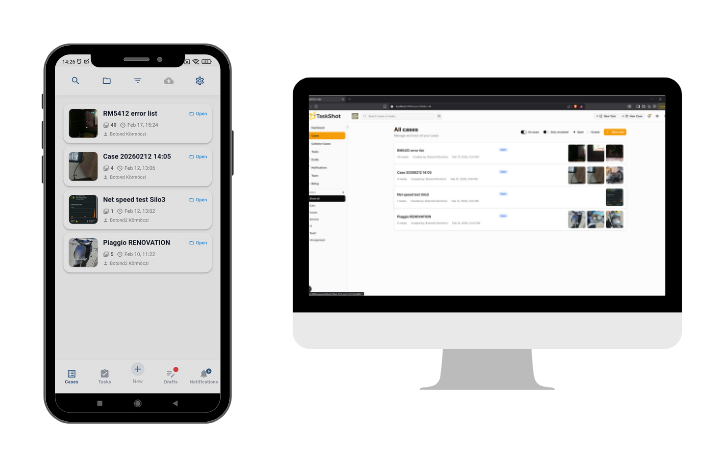
TaskShot keeps all work evidence in one structured case.
Teams can upload photos and videos, add notes and documents, assign tasks, and keep the full history searchable and organized.
Product workflow overview
See how a job becomes a traceable case
From photo to finished work - in a simple flow
01
Create a workspace
Set up your organization and invite the first users without a heavy implementation project.
02
Start a case
Open a case for a real job, inspection, handover, or service workflow.
03
Add photos, files, and tasks
Keep visual proof, notes, documents, and follow-up tasks connected in one place.
04
Share or close with history
Review traceable history, share what is needed, and close cases with clear proof.
01
Create a workspace
Set up your organization and invite the first users without a heavy implementation project.
02
Start a case
Open a case for a real job, inspection, handover, or service workflow.
03
Add photos, files, and tasks
Keep visual proof, notes, documents, and follow-up tasks connected in one place.
04
Share or close with history
Review traceable history, share what is needed, and close cases with clear proof.
Start on your own - or get help when you need it
TaskShot is built to be simple enough for teams to start without a heavy implementation project. For larger teams or structured rollouts, optional assisted onboarding is available.
Self-serve setup
Create a workspace, invite your team, and start using TaskShot with built-in guides and tutorials.
Assisted onboarding
Get help setting up your first workflows, users, and documentation structure.
Enterprise rollout
For larger organizations that need a structured rollout, onboarding plan, and workflow alignment.
Assisted onboarding helps your team adopt TaskShot faster. It does not include custom software development.
Everything your team needs to document work clearly
Business-ready capabilities for structured, traceable operational documentation.
Fast mobile documentation
Capture instantly what you see. With the Draft system, you can record important information in seconds, then organize it into cases later. No more paper and pen.
Smart media management
The system automatically creates thumbnails for images and videos. Fast browsing, less data usage, better performance on all devices.
Structured photography
Create templates for common tasks (e.g., car handover: license plate → dashboard → 4 corners). The system guides the photography so nothing is missed.
Organized documentation
Group related cases under collection cases. Clean structure, easy navigation, quick finding.
Task management
Create tasks, assign them to team members, and track progress. Tasks can be linked to cases, keeping all information in one place.
Mother-child organization management
Manage parent organizations and linked child organizations with delegated access. Keep visibility and control while operating across multiple legal entities or branches.
Add-on seats on demand
When your team grows, extend user capacity instantly with add-on seats. Increase or reduce capacity from billing without changing your base plan.
External collaboration
Send secure links to external partners who can upload content without registering. Expiring links, full control.
Mobile OCR for case naming
Extract plate numbers and text directly from photos on mobile to speed up case creation and reduce manual typing.
HD capture by default
Subscribed organizations get the mobile camera opening in HD photo and video for every new session. Workers can still turn HD off on the camera when they need to save data or battery.
Document management
Keep PDFs and office files next to photos and videos on cases and tasks. Upload from web or share into the app, with a dedicated documents area and optional labels.
See what changed
The system indicates which cases have new content since you last viewed them. Never miss important updates again.
Less searching. Fewer forgotten tasks. Better proof.
Every lost photo, repeated question, forgotten follow-up, or undocumented issue costs time. TaskShot reduces this by keeping the full work history in one place.
Less time spent searching
Find photos, documents, and context in one place instead of digging through multiple tools.
Fewer forgotten follow-ups
Track responsibilities and reduce dropped tasks across field and office teams.
Stronger proof when questions come
Show what happened and when with a traceable case history.
Simple, transparent pricing
Self-serve plans by default, optional assisted onboarding as an add-on, and enterprise rollout support when needed.
Early adopter pricing - limited time
Lock your current price for 12 months.
Join during our early adopter period and keep your current subscription price for 12 months. New pricing will apply after the early access period ends.
Capture
Contact us for enterprise inquiries
For small teams that need structured photo/video case documentation.
- 5 users included
- Case management
- Mobile photo/video capture
- Tasks
- Secure share links
- Basic support
Team
Contact us for enterprise inquiries
For growing operations with document-heavy workflows.
- 15 users included
- Everything in Capture
- OCR
- Document management
- Case templates
- Priority support
Scale
Contact us for enterprise inquiries
For multi-team operations with repeatable field processes.
- 50 users included
- Everything in Team
- Recurring tasks
- HD capture
- 3 child organization slots
- Onboarding support
Enterprise
Contact us for enterprise inquiries
For large organizations with procurement, governance, and SLA requirements.
- 100+ users or site-based pricing
- SLA
- Dedicated support
- Procurement support
- Integration scoping
- Advanced governance
Optional add-ons
Optional add-ons include assisted onboarding for teams that want a guided rollout path.
Extra userContact us for enterprise inquiries
OCR packContact us for enterprise inquiries
Child organization slotContact us for enterprise inquiries
Operational onboarding (white-glove)Contact us for enterprise inquiries
On-premise storage option (MinIO)
Need to keep media files inside your own infrastructure? TaskShot can connect to your own S3-compatible MinIO storage.
Self-serve registration and checkout currently supports AWS-hosted storage only. For on-premise storage, please contact us and we will provide a tailored setup proposal.
Capture On-Prem: Contact us for enterprise inquiries
Team On-Prem: Contact us for enterprise inquiries
Scale On-Prem: Contact us for enterprise inquiries
Enterprise On-Prem: Contact us for enterprise inquiries
Setup fees
Technical setup covers storage integration and infrastructure configuration (MinIO endpoint, access, connectivity, and validation).
Technical setup - Standard: Contact us for enterprise inquiries
Technical setup - Advanced: Contact us for enterprise inquiries
Technical setup - Enterprise: Contact us for enterprise inquiries
Operational onboarding (white-glove) is separate: process/workflow design, team enablement, and go-live support.
Support
Hourly support: Contact us for enterprise inquiries
Email support pack: Contact us for enterprise inquiries
Priority support pack: Contact us for enterprise inquiries
Enterprise SLA: Contact us for enterprise inquiries
With on-premise storage, the customer is responsible for storage operation, backups, availability, security and data retention.
Start with one workflow. No long-term commitment.
A trial period is available so your team can evaluate TaskShot with real cases before committing.
Generous storage included. Additional storage available as your team grows.
Cloud and on-prem pricing are listed separately to keep procurement and responsibility clear.
Built for business workflows, not casual file sharing
TaskShot is designed around organization-based access, structured cases, and controlled sharing, so work documentation does not get lost in personal tools.
Secure user accounts
Organization-based access
Controlled sharing links
Cloud-based storage
Mobile and web access
Designed for traceable work history
Who is behind TaskShot
Built by a founder close to real operational workflows
TaskShot is built as a focused, independent product for teams that need clear proof, structured documentation, and less scattered work.

Founder-led product
Botond Kormoczi
I built TaskShot to help operational teams turn scattered photos, notes, documents, and tasks into structured, traceable proof-of-work cases.
TaskShot is currently founder-led, which means decisions are fast, customer feedback goes directly into the product, and the focus stays on solving real workflow problems instead of building unnecessary complexity.
TaskShot was created to solve a practical problem: work evidence gets scattered across phones, chats, email, and folders.
Founder-led means fast decisions and direct customer feedback loops.
Early customers get onboarding support directly from the person building the product.
Selected early teams can get direct founder-led onboarding support.
Frequently asked questions
Answers to common onboarding and adoption concerns.
Start with one workflow
Start independently with a free trial, or request a guided pilot for larger teams.
Self-serve setup. Optional assisted onboarding for larger teams.
Need rollout help?
Send us a message
Tell us about your workflow and current bottlenecks. We will help you set up a proof-ready process quickly.